
How to Find a Film When You Can’t Remember the Name
You know the feeling. There’s a scene stuck in your head, maybe a woman running through a rainy train station, or two brothers arguing in a car that’s clearly about to break down. You remember how it made you feel. You even remember who you watched it with. But the title? Gone.
So you open a search bar and type something like “What is my movie?” and hope for the best.
I’ve been there more times than I’d like to admit, and I’ve learned that finding a half-remembered film is a skill. It’s less about luck and more about knowing which clues matter and where to take them. In this guide, I’ll walk you through the exact steps I use, from simple Google tricks to AI chatbots and online communities that love this kind of puzzle.
Why You Forget Movie Titles in the First Place
First, a bit of comfort: forgetting a title doesn’t mean your memory is broken. Movie titles are strangely hard for the brain to hold on to. A title is just a few words, and it often has nothing to do with the story. Meanwhile, scenes, faces, and feelings are rich and sticky. Your brain keeps the good stuff and quietly drops the label.
It also doesn’t help that we watch movies half-distracted. Maybe you caught the last forty minutes on TV at a relative’s house, or you watched it on a long flight, or you were a kid and never knew the name to begin with. That’s all normal, and it’s all fixable.
Step One: Write Down Everything You Remember
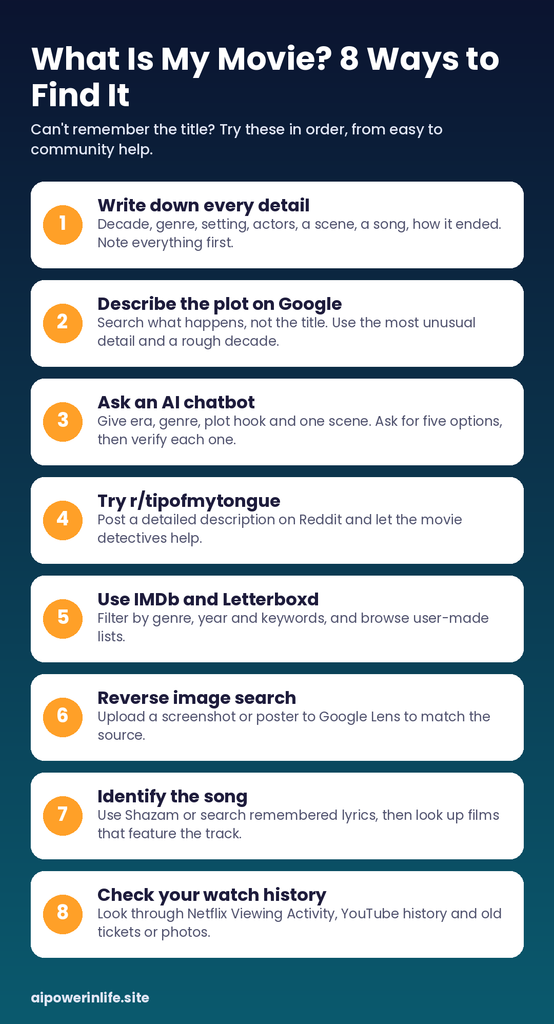
Before you search anything, take two minutes and dump every detail onto a note. Don’t filter. Even the “useless” details can be the one that cracks the case. Try to answer these:
- When did you watch it? Even a rough decade helps. “Sometime when I was in school” is still useful.
- What was the genre? Comedy, horror, romance, animation, or thriller?
- Where was it set? A small town, outer space, a hospital, a different country?
- Who was in it? Even “that guy who was in the other movie with the dog” counts.
- What language was it in? And did you watch it dubbed or subtitled?
- What did it look like? Black and white, cartoon, grainy, super colorful?
- Any specific scene, line, or song? One strong scene is worth ten vague plot summaries.
- How did it end? Endings are surprisingly searchable.
Having this list ready makes every method below work better, because you’re not trying to remember on the fly while you search.
Method 1: Describe the Plot in Plain Words on Google
This is where most people start, and it works more often than you’d think. The trick is to describe what happens, not what you think the movie is called.
A weak search looks like this: “that movie with the guy and the thing.”
A stronger search looks like this: “movie where a man wakes up every day to the same day and tries to escape the loop.” (You probably guessed that one. That’s the point. A clear one-sentence summary does the heavy lifting.)
A few tips that help:
- Lead with “movie” or “film,” then the core idea.
- Include the most unusual detail, not the most common one. “A dog that talks” is better than “a family.”
- Add a rough decade, like “90s movie” or “early 2000s.”
- If you remember a line of dialogue, put it in quotation marks.
If your first search fails, change the wording instead of repeating it. Search engines respond to different phrasing in different ways.
Method 2: Ask an AI Chatbot “What Is My Movie?”
This is the method that has changed the game in the last couple of years. Tools like ChatGPT, Gemini, and Claude are good at turning messy, half-remembered descriptions into a short list of likely titles. That’s exactly the “what is my movie” problem.
Here’s a prompt that works well:
“I’m trying to remember a movie. I watched it around 2005. It’s a comedy, I think American. A guy loses his job and starts a business with his neighbor. There’s a scene where they argue in a parking lot at night. The lead actor had curly hair. What movie could this be? Give me five possibilities and tell me why each one fits.”
Notice what makes that prompt useful. It gives the era, the genre, a plot hook, a scene, and one physical detail. It also asks for several options and a reason for each, which lets you judge the guesses instead of trusting a single answer.
One honest warning: AI tools can sound confident and still be wrong, and they sometimes invent titles that don’t exist. Always double-check any suggestion on a site like IMDb before you get excited. Treat the chatbot as a very smart brainstorming partner, not a final answer.
Method 3: Try the “Tip of My Tongue” Crowd on Reddit
If search engines and chatbots strike out, humans usually win. Reddit has a community called r/tipofmytongue, where thousands of film lovers spend their free time solving exactly this kind of mystery. Many posts are answered within hours.
To get a fast reply, write a good post:
- Put the medium in the title, such as “[TOMT] [MOVIE]” followed by a short hook.
- Share the rough year, the genre, and where you watched it.
- Describe one or two vivid scenes in detail.
- Mention what you’ve already tried, so people don’t suggest the obvious.
- Come back and mark the post as solved when someone nails it. It helps the next person with the same problem.
Check the community rules before posting, since they’re fairly strict about format.
Method 4: Use IMDb and Letterboxd to Narrow It Down
Movie databases aren’t only for looking up titles you already know. Their advanced search tools let you filter by things you do remember.
On IMDb, you can search by genre, release year range, and keywords. If you know the story involved a “road trip” and a “wedding,” you can try those as keywords and then scan the results. Letterboxd works in a similar way, and its user-made lists are a hidden treasure. Someone has almost certainly made a list called something like “Movies Where a Group of Friends Gets Lost in the Woods,” and your film might be on it.
This method takes more patience, but it’s great when you only remember broad details.
Method 5: Reverse Image Search for a Screenshot or Poster
Maybe you remember what the movie looked like, or you have a photo of the TV screen, or you saw a clip on social media with no caption. In that case, search with the image itself.
Google Lens and similar reverse image tools can match a still frame, a poster, or a cropped scene to its source. Take a clear screenshot, upload it, and see what comes back. It won’t always work with dark or blurry frames, but when it does, it’s almost instant.
Method 6: Identify the Song
Sometimes the thing you remember best isn’t the story at all. It’s the music. If a specific song is played in a scene, a music recognition app like Shazam can name the track, and from there you can search for “movies that feature [song name].”
Even if you only remember a few lyrics, searching them in quotation marks can lead you to the song, and then to the film. Websites that track songs used in movies and shows are especially helpful here.
Method 7: Check Your Own Watch History
This one is so obvious that most people skip it. If you watched the film on a streaming platform, it might still be sitting in your history.
Netflix has a “Viewing Activity” page in your account settings. YouTube keeps a watch history. Other services like Prime Video and Disney+ track what you’ve watched too. Scroll back to the rough time you remember, and you might find the title waiting for you.
Also check your own paper trail: old emails with ticket confirmations, photos from a cinema trip, or a Notes app where you once jotted down “watch this later.”
Method 8: Ask Real People
Don’t underestimate the group chat. Send a short message to friends and family describing the scene, and let the memories do their thing. Someone will often remember the title instantly because they watched it with you.
Older relatives are particularly good for movies from your childhood. And if you’re a student or work in an office, a single question in a shared channel can solve it in minutes.
A Quick Example of How This Works
Let’s say you remember this much: a kids’ animated film, probably from the early 2000s, with a character who was a lonely robot, and a scene near the end where it sacrifices itself to save a town in a snowstorm.
Your first move is to write that down and add what you can: you watched it at school, it had a sad ending, and the robot didn’t talk much. Then you search with a plain description. If Google doesn’t help, you paste the same notes into an AI chatbot and ask for five options. You check each suggestion on IMDb, looking at the plot summary and the release year. If none match, you post the full description on r/tipofmytongue and wait.
That layered approach, from quick and easy to community help, solves most cases without much stress.
How to Describe a Movie So Searches Actually Work
The quality of your description decides everything. Here’s a quick comparison:
| Weak description | Stronger description |
| “A sad movie about a guy” | “A drama where a widowed man travels across the country with his late wife’s ashes” |
| “A funny movie from long ago” | “A late-90s comedy where two friends accidentally become bodyguards” |
| “A scary movie with a house” | “A horror film where a family hears a child’s voice inside the walls of their new home” |
Specific nouns and actions beat vague feelings every time. If you can’t remember specifics, say what’s odd about the movie. Odd details are what search engines and humans latch onto.
Common Mistakes When Searching for a Forgotten Movie
A few traps catch almost everyone:
- Mixing up two films. Our memories blend scenes together. If your clues contradict each other, you might be remembering two different movies.
- Confusing a TV episode with a movie. Some “movies” turn out to be a single episode of a series. Keep that possibility open.
- Remembering a trailer instead of the film. Trailers often include scenes that aren’t even in the final cut.
- Trusting the exact year. Be generous with your date range. Give yourself five years on either side.
- Searching only in English. If the movie was foreign, try describing it in your original language too.
Frequently Asked Questions
What is my movie if I only remember one scene?
One scene is often enough. Describe it in as much detail as you can, including the setting, the characters’ actions, and any dialogue. Search it on Google, then try an AI chatbot or Reddit if the results are weak.
Can AI really find a movie from a vague description?
Often, yes. AI tools are good at matching fuzzy descriptions to likely titles. But they can be wrong, so verify every suggestion on IMDb or a similar database before you trust it.
How do I find a movie if I don’t know the year?
Think about your age when you watched it, the technology in the scenes (flip phones, VHS tapes, smartphones), and the fashion. These clues can help you estimate a decade even without a date.
Is there a free tool to find a movie by description?
Yes. Google Search, Reddit’s r/tipofmytongue, IMDb’s search filters, and free versions of popular AI chatbots can all help without costing anything.
What should I do if nothing works?
Take a break and come back with fresh eyes. Memories often return when you stop forcing them. When you do try again, add any new detail that has surfaced and post it to a community forum.
Final Thoughts
The next time you catch yourself wondering “what is my movie,” don’t panic and don’t give up. Write down every detail you remember, start with a simple search, try an AI chatbot for quick ideas, and call in the Reddit crowd if you need real human detectives. Between them, there’s a very good chance your mystery film is only a few minutes away.
Save the title the moment you find it (a Letterboxd or IMDb watchlist works well), and use a site like JustWatch to see where it’s streaming. And when you finally see that title pop up and everything clicks, you’ll get one of the best little feelings the internet can give you.