
A Complete Beginner’s Guide (2026)
Memes are the language of the internet. A single image with a short caption can make a whole group chat laugh, explain a complicated feeling in two seconds, or help a small brand get noticed. The good news is that you do not need design skills, expensive software, or a big budget to make your own meme. You need a funny idea, a template, and a free tool that takes about a minute to learn.
In this guide, you will learn exactly how to make your own meme from scratch, step by step. We will cover how to choose a format, how to write captions that land, how AI meme generators speed up the process, which mistakes to avoid, and how to share your finished meme so people actually see it.
What Is a Meme, and Why Make Your Own?
A meme is an idea, joke, or feeling that spreads online, usually as an image, GIF, or short video with text. Most memes work because they are relatable. When someone sees a “Monday morning” meme, they instantly recognize the feeling and pass it on.
So why make your own meme instead of just sharing someone else’s?
- It is personal. A meme about your own team, hobby, or inside joke lands harder than a generic one.
- It stands out. Popular memes get recycled constantly. An original caption on a familiar template feels fresh.
- It is useful for work. Social media managers, teachers, and small business owners use memes to make content more human and shareable.
- It is fun. Making memes is a quick creative outlet that takes minutes, not hours.
What You Need Before You Start
You only need three things to make your own meme:
- An idea or situation. A relatable moment, a common frustration, or a reaction to something happening right now.
- An image or template. This can be a classic meme template, a screenshot, or your own photo.
- A meme maker. A free online tool or app where you can add text over an image.
That is it. No account, download, or design experience is required for most browser-based tools.
How to Make Your Own Meme in 7 Steps
Follow this simple process and you can go from a blank screen to a finished meme in under five minutes.
Step 1: Start With a Relatable Idea
The best memes begin with a feeling, not a picture. Ask yourself: what situation do my friends, coworkers, or followers all experience? Examples include waiting for a reply, juggling too many tabs, trying a healthy habit for one day, or explaining your job to relatives.
Write the idea in one plain sentence first. If you cannot explain the joke in one sentence, the meme is probably too complicated.
Step 2: Choose the Right Meme Format
Every meme format has a built-in structure. Pick one that matches the shape of your joke:
- Two-panel comparison (like “rejecting one thing, approving another”) works for preferences and choices.
- Reaction images work for how you feel about something.
- Multi-panel escalation works for jokes that get more extreme.
- A single image with top and bottom text works for classic setup-and-punchline humor.
Using a format people already recognize saves you work, because the audience understands the joke structure before they read a single word.
Step 3: Pick a Meme Maker
Open a free meme maker in your browser or phone. Look for one that offers a large template library, easy text editing, and clean exports. If you want to speed things up, choose a tool with AI caption suggestions (more on that below).
Step 4: Add Your Text
Click the text areas and type your caption. Keep these rules in mind:
- Short beats long. Aim for under 15 words per text box.
- Put the punchline last. The reader should reach the funny part at the end.
- Use plain language. Avoid jargon unless the joke is for a specific community.
- Match the template’s meaning. If the image shows disappointment, your text should set up a disappointing situation.
Step 5: Style the Text for Readability
A funny meme that is hard to read gets scrolled past. Use bold, high-contrast text, such as white letters with a black outline. This is the classic meme look because it stays readable on any background. Make sure the text does not cover important faces or details in the image.
Step 6: Read It Like a Stranger
Before exporting, step back and read your meme as if you have never seen it. Does the joke make sense without extra explanation? Is there any typo? Would it still be funny to someone outside your friend group? If the answer is no, simplify the caption or try a different template.
Step 7: Export and Save
Download your meme as a PNG or JPG for static images, or as a GIF or MP4 for animated memes. Save a copy on your device so you can reuse or remix it later. Use a high-resolution export so the text stays sharp when shared on social media.
Make Your Own Meme With AI
AI has changed how people create memes. Instead of staring at a blank template wondering what to write, you can describe your idea in plain words and let an AI tool suggest captions or even pick a matching template for you.
Here is how AI helps when you make your own meme:
- Caption suggestions. Type a topic like “working from home” and get several caption options in seconds. You can pick the best one or edit it to match your humor.
- Template matching. Some AI meme generators choose a format that fits your joke, which saves time scrolling through hundreds of options.
- Multiple languages. Many tools can write captions in different languages, which is useful for global audiences.
- Text-to-meme workflows. You type one sentence and receive several ready-to-post meme drafts.
- Image and GIF tools. Some platforms also include background removers, face editors, and GIF makers in the same place.
A Smart Way to Use AI
AI is a starting point, not a replacement for your own sense of humor. The funniest memes still come from specific, real experiences. Try this workflow:
- Describe your situation to the AI in one sentence.
- Generate several caption options.
- Pick the best one and rewrite it in your own voice.
- Add one personal detail that only your audience would understand.
That final personal touch is what separates a forgettable meme from one people tag their friends on.
Popular Meme Formats and When to Use Them
Knowing a few classic formats makes it much easier to make your own meme quickly.
| Format | Best For | Example Use |
| Two-option comparison | Choices and preferences | Old habit vs. new habit |
| Distracted/temptation style | Priorities and temptations | Focus vs. a shiny distraction |
| “This is fine” style | Stress and chaos | Deadlines piling up |
| Expanding brain | Ideas that get more extreme or more clever | Levels of productivity hacks |
| Reaction faces | Quick emotional responses | Reacting to a surprising update |
| Change-my-mind style | Opinions and hot takes | Harmless debates about everyday habits |
You do not need to memorize these. Browse your meme maker’s template gallery, sort by trending or popular, and choose the one whose image matches your joke’s mood.
Types of Meme Maker Tools
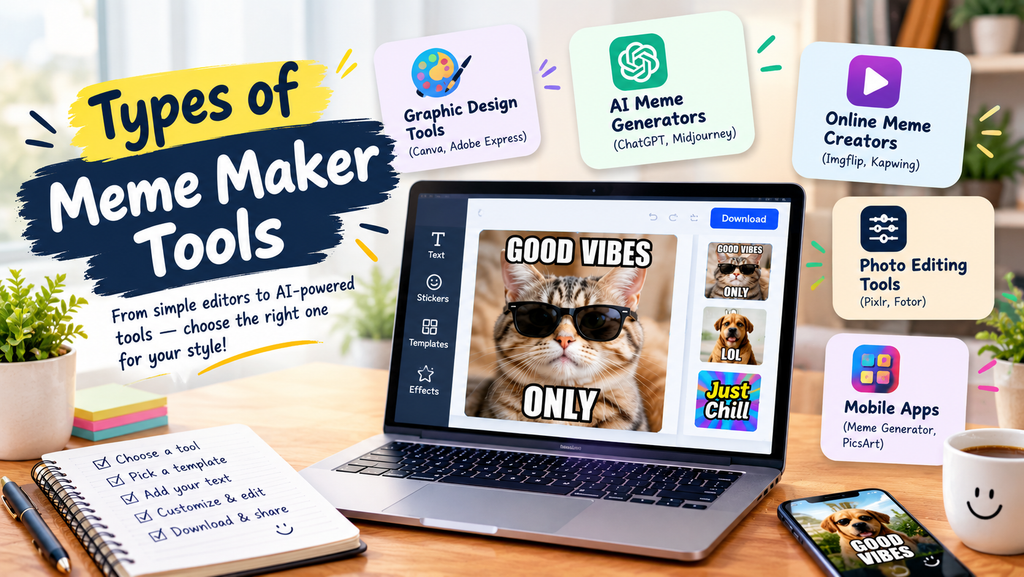
There are several kinds of tools you can use to make your own meme. Each fits a different need.
1. Browser-based meme generators. These are the easiest options. Open the site, choose a template, type your caption, and download. Many are free and require no sign-up for basic use.
2. AI meme generators. These add automatic caption writing or template selection. They are ideal when you have the idea but not the wording.
3. General design tools. Platforms like Canva or Kapwing let you build memes from scratch with full control over fonts, layouts, and effects. They have more of a learning curve but offer more flexibility.
When choosing, check three things: whether the free version adds a watermark, whether the export quality is high enough for social media, and whether the template library is updated with current trends. Features and pricing change often, so confirm the current details on the tool’s own website.
Anyone can add text to an image. These tips help your meme actually get shared.
- Be specific. “When your boss says ‘quick call'” is funnier than “When work is annoying.” Specific details feel real.
- Know your audience. A programmer meme works for developers but not for a general crowd. Write for the people most likely to share it.
- Keep it simple. One joke per meme. If you need a paragraph, it is not a meme.
- Use contrast. Memes often work through the gap between expectation and reality. Set up a normal situation, then twist it.
- Make it relatable, not mean. Humor that includes people travels further than humor aimed at them.
Common Mistakes to Avoid
Even good ideas fall flat when the execution is off. Watch out for these frequent errors.
Too much text. Long captions kill the rhythm. Cut every word that is not needed.
Explaining the joke. If you add a note explaining why it is funny, it is no longer funny. Rewrite the caption instead.
Ignoring the template’s meaning. Each meme template carries a built-in meaning. Using it for the opposite meaning confuses viewers.
Posting something that could hurt someone. Avoid humor that targets people for their identity, health, or personal struggles.
Copyright and Safety Basics
When you make your own meme, a few simple habits keep you out of trouble.
- Be careful with brand and commercial use. Memes made from copyrighted images are generally fine for casual, personal sharing, but using them in paid advertising or products can create legal risk. If you are making memes for a business, consider using your own images, licensed images, or templates that the tool states are free to use.
- Do not use private photos without permission. Never turn someone’s photo into a meme without their consent, especially if it could embarrass them.
- Avoid misinformation. A meme that spreads a false claim can mislead people, even if it started as a joke.
- Check platform rules. Each social network has its own policies on harassment, hate content, and copyrighted media.
This is general information, not legal advice. If you plan to use memes commercially, check the tool’s terms and consult a professional if needed.
How to Share Your Meme
A great meme still needs to reach people. Here is how to give it the best chance.
- Pick the right platform. Reddit and X suit text-heavy, topical humor. Instagram and TikTok favor visual and video memes. WhatsApp and Discord are perfect for inside jokes.
- Write a short caption or none at all. Let the meme do the work.
- Engage with replies. Replying to comments encourages more shares.
Frequently Asked Questions
How do I make my own meme for free?
Use a free browser-based meme maker. Choose a template or upload an image, add your text, and download the result. Many tools let you do this without creating an account, although some add a watermark to free exports.
Can I make my own meme on my phone?
Yes. You can use a mobile browser or a meme app. The process is the same: pick an image, add text, and save or share it directly from your phone.
Do I need design skills to make a meme?
No. Meme makers are built for beginners. The main skill is writing a short, relatable caption, and that gets easier with practice.
How can I make my own meme using AI?
Describe your idea in one sentence to an AI meme generator. It can suggest captions or select a template for you. Review the results, edit them in your own voice, and export the one you like best.
Is it legal to make a meme from a copyrighted image?
Rules vary by country and by how you use the meme. Personal, non-commercial sharing is usually low risk, but commercial use is different. When in doubt, use your own images or properly licensed ones.
Final Thoughts
Learning to make your own meme is one of the easiest creative skills you can pick up. Start with a relatable idea, choose a format that fits the joke, keep the text short and readable, and use AI tools when you need a creative nudge. Then add your own voice, because that is what makes people stop scrolling.
Open a meme maker today, pick a template, and make your first one. Your next favorite joke might be only a minute away.